
I've been looking for a program to tag and organize my music collection. I have a lot of MP3's stored on my HDD, but most of them aren't properly tagged, are missing their release year, are scattered or double, etc.
Most of my music is sorted into alphabetical folders. I've created a MUSIC folder, with A to Z subfolders. In those, I simply made folders for each artist/group. But I also have lots and lots of seperate songs that I just download when I hear a song I like on the radio. I collect those into folders by year. So I have a "Various" folder with subfolders from 1970 - 2014. Obviously, this is where many songs get duplicats if I also have a complete album of a certain artist/group.
So what I'd prefer is a system to organize all my music into folders on my HDD, with a way to either play entire albums or all songs from a certain time period or even genre.
What I want is to keep them in windows-structured folders, and not simply thrown onto one giant heap of files that only my music organizer software can manage. I still want to be able to select one folder and copy that to my smartphone or USB for my car.
So, how to do this. Will it be smarter to simply let go of the Albums A-Z folders, and try to arrange all MP3's into year-folders? Or should I keep the A-Z and store all songs into Artist/Group name folders, even if I only have 1 or 2 songs of a certain artist? And then let the software sort them by name or by year or by type/genre?
How do you do this? PS: I hate iTunes. It disregards my windows folder system. I like having a system I can manage even without software.
I'm going to try MusicBee and MP3Tag for tagging and organizing, and see what they do.
-
- Advertisement
Make a small donation to Ye Olde Inn!
Every cent received goes toward Ye Olde Inn's maintenance and allows us to continue providing the best resources for HeroQuest and Fantasy Gaming fans.
Organizing your music
Forum rules
Certain topics have become known to cause friction among passionate members. We kindly ask that topics relating to these subjects be taken outside the Inn to Websites that specialise in those subjects.
Thus far, these topics are: Recreational Drugs, Religion and Science.
Certain topics have become known to cause friction among passionate members. We kindly ask that topics relating to these subjects be taken outside the Inn to Websites that specialise in those subjects.
Thus far, these topics are: Recreational Drugs, Religion and Science.
14 posts
• Page 1 of 2 • 1, 2
Organizing your music
 by Sjeng » April 6th, 2014, 3:37 am
Check out my YouTube channel Boardgame Heaven, and drop me a sub please!
Rewards:


-

Official Spokesman
Sjeng
Ye Olde Orcish Bard
Wizard
- Posts: 4537
- Images: 92
- Joined: July 26th, 2011, 9:58 am
- Location: The Netherlands
- Forum Language: Nederlands
- Hero:

- Evil Sorcerer: Morcar
- Usergroups:


Advertisement
Make a small donation to Ye Olde Inn!
Every cent received goes toward Ye Olde Inn's maintenance and allows us to continue providing the best resources for HeroQuest and Fantasy Gaming fans.
Re: Organizing your music
by knightkrawler » April 6th, 2014, 4:55 am
I basically have the same problem. No solution whatsoever.
HQ - Heroes & Villains (Dropbox-download link) https://www.dropbox.com/sh/jgj0kzsys9w38oh/AAA_VEHx6vMv4HKRX7IiOWTFa?dl=0
Feedback http://forum.yeoldeinn.com/viewtopic.php?f=38&t=3560
Gallery http://forum.yeoldeinn.com/viewtopic.php?f=56&t=1972&hilit=knightkrawler+gallery&start=200
____________________________________________________________________________________________________________
I've found a way of paying off old debts:
Always make more promises than you can break.
Feedback http://forum.yeoldeinn.com/viewtopic.php?f=38&t=3560
Gallery http://forum.yeoldeinn.com/viewtopic.php?f=56&t=1972&hilit=knightkrawler+gallery&start=200
____________________________________________________________________________________________________________
I've found a way of paying off old debts:
Always make more promises than you can break.
Rewards:


-

Cheese Baron
knightkrawler
The Furry Blue Derailer
Witch Lord
- Posts: 5825
- Images: 27
- Joined: May 25th, 2012, 2:26 pm
- Location: Regensburg, Germany
- Forum Language: English (United States)
- Hero:
- Evil Sorcerer: Morcar
- Usergroups:
Re: Organizing your music
by Maike05 » April 6th, 2014, 5:25 am
Try musicbrainz picard and mp3tag as a complementary solution.
The first can detect tag based on the musical footprint like shazam or soundhound. The second one enable you to play with id3tags
The first can detect tag based on the musical footprint like shazam or soundhound. The second one enable you to play with id3tags
I use my broadsword !!
http://heroquest-painted.blogspot.com/
http://free-dungeon-tiles-to-print.blogspot.com/
http://yeoldeinn-heroquest.blogspot.com/

Join the community project !
http://heroquest-painted.blogspot.com/
http://free-dungeon-tiles-to-print.blogspot.com/
http://yeoldeinn-heroquest.blogspot.com/
Join the community project !
Rewards:


-

Maike05
Elven Archer
- Posts: 562
- Images: 25
- Joined: March 18th, 2011, 10:39 pm
- Location: Brussels, Belgium
- Forum Language: English (United States)
- Hero:

- Evil Sorcerer: Morcar
- Usergroups:
Re: Organizing your music
by Sjeng » April 6th, 2014, 6:01 am
I don't understand how MP3Tag works... I can convert filenames to tags and vice versa, but I can't let it auto-tag my mp3's for some reason. It asks me for a search field, but I want it it auto search ALL my files, and find artist/title/year...
Check out my YouTube channel Boardgame Heaven, and drop me a sub please!
Rewards:
-
Official Spokesman
Sjeng
Ye Olde Orcish Bard
Wizard- Posts: 4537
- Images: 92
- Joined: July 26th, 2011, 9:58 am
- Location: The Netherlands
- Forum Language: Nederlands
- Hero:
- Evil Sorcerer: Morcar
- Usergroups:
Re: Organizing your music
by Maike05 » April 6th, 2014, 6:23 am
you have to set up a folder for source where your mp3's are stored. Click on File / change folder et browse where your music is.
then, go to Convert / file name -> tags this option allows you to read a file with a mask : %artist%, %album%, %title%
then, if your file is named like this : system of a down - storage.mp3 the " - " is the separator for tags.
therefore, the reading mask should be %artist% - %title%
finally, if you want to organize your library by genre, you should try this command in menu Convert / tag -> filename: genre%\%artist%\%album%\%artist% - title%
then, go to Convert / file name -> tags this option allows you to read a file with a mask : %artist%, %album%, %title%
then, if your file is named like this : system of a down - storage.mp3 the " - " is the separator for tags.
therefore, the reading mask should be %artist% - %title%
finally, if you want to organize your library by genre, you should try this command in menu Convert / tag -> filename: genre%\%artist%\%album%\%artist% - title%
I use my broadsword !!
http://heroquest-painted.blogspot.com/
http://free-dungeon-tiles-to-print.blogspot.com/
http://yeoldeinn-heroquest.blogspot.com/
Join the community project !
http://heroquest-painted.blogspot.com/
http://free-dungeon-tiles-to-print.blogspot.com/
http://yeoldeinn-heroquest.blogspot.com/
Join the community project !
Rewards:
-
Maike05
Elven Archer- Posts: 562
- Images: 25
- Joined: March 18th, 2011, 10:39 pm
- Location: Brussels, Belgium
- Forum Language: English (United States)
- Hero:
- Evil Sorcerer: Morcar
- Usergroups:
Re: Organizing your music
by Maike05 » April 6th, 2014, 6:30 am
If you want to autotag your library, you should use Musicbrainz first : http://musicbrainz.org/doc/MusicBrainz_Picard
It will search based on the audio footprint, then on the filename. When it finds a match, it propose you the result on the right hand pane, which you have to approve to apply changes.
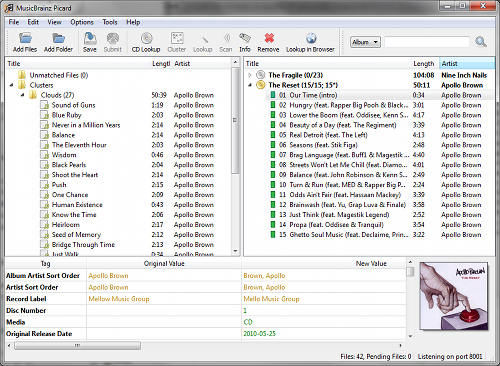
Then, and only then, you should use mp3tag to manage the tags and organize the library by folders.
There also are many other automated tools from musicbrainz which you can try : http://musicbrainz.org/doc/Products
It will search based on the audio footprint, then on the filename. When it finds a match, it propose you the result on the right hand pane, which you have to approve to apply changes.
Then, and only then, you should use mp3tag to manage the tags and organize the library by folders.
There also are many other automated tools from musicbrainz which you can try : http://musicbrainz.org/doc/Products
I use my broadsword !!
http://heroquest-painted.blogspot.com/
http://free-dungeon-tiles-to-print.blogspot.com/
http://yeoldeinn-heroquest.blogspot.com/
Join the community project !
http://heroquest-painted.blogspot.com/
http://free-dungeon-tiles-to-print.blogspot.com/
http://yeoldeinn-heroquest.blogspot.com/
Join the community project !
Rewards:
-
Maike05
Elven Archer- Posts: 562
- Images: 25
- Joined: March 18th, 2011, 10:39 pm
- Location: Brussels, Belgium
- Forum Language: English (United States)
- Hero:
- Evil Sorcerer: Morcar
- Usergroups:
Re: Organizing your music
by TMU » April 6th, 2014, 6:35 am
I just download my music to the computer and do CDs. Then I delete those songs and they don't stack up 
Ps. my cousin makes music:
I know atleast knigthcrawler won't like this
Edit. WAIT I'll get it working!
Ps. my cousin makes music:
I know atleast knigthcrawler won't like this
Edit. WAIT I'll get it working!
Last edited by Sjeng on April 6th, 2014, 6:42 am, edited 1 time in total.
Reason: NO SPACES!!
Reason: NO SPACES!!
"There is no greater danger than playing it safe."
Rewards:

-

Second Lieutenant
TMU
Swordsman
- Posts: 1870
- Images: 15
- Joined: November 17th, 2012, 2:55 pm
- Location: Rauma, Finland
- Forum Language: British English
- Hero:
- Evil Sorcerer: Morcar
- Usergroups:
Re: Organizing your music
by TMU » April 6th, 2014, 6:44 am
Damn you Sjeng... Damn you...
"There is no greater danger than playing it safe."
Rewards:
-
Second Lieutenant
TMU
Swordsman- Posts: 1870
- Images: 15
- Joined: November 17th, 2012, 2:55 pm
- Location: Rauma, Finland
- Forum Language: British English
- Hero:
- Evil Sorcerer: Morcar
- Usergroups:
Re: Organizing your music
by Sjeng » April 6th, 2014, 6:46 am
Maike05 wrote:If you want to autotag your library, you should use Musicbrainz first : http://musicbrainz.org/doc/MusicBrainz_Picard
It will search based on the audio footprint, then on the filename. When it finds a match, it propose you the result on the right hand pane, which you have to approve to apply changes.
Then, and only then, you should use mp3tag to manage the tags and organize the library by folders.
There also are many other automated tools from musicbrainz which you can try : http://musicbrainz.org/doc/Products
I've tried this one, but I can't get the YEAR to show in the list. *sigh* I just want the program to fill in the blanks: YEAR, and if needed artist/title. If it's already filled in, it doesn't need to list them for me.
I don't see how to select MP3's that only have missing tags, and how to do a search and approve the suggestions at all... Just can't figure it out.
I've read this https://musicbrainz.org/doc/How_to_Tag_ ... ith_Picard and apparently it needs to link any song with an album. Well, sure, okay, no problem, but then it suggests tags for you, but where is the Approve button? How do I apply the suggested tags?
edit: by clicking SAVE apparently. Still a tedious way to do this. And some albums are released a lot later than the actual song, if it's on a collection album (greatest hits of...)
This annoys me beyond measure. I just need to tag ALL my mp3's with the correct YEAR, that alone would make me infinately happy.
Check out my YouTube channel Boardgame Heaven, and drop me a sub please!
Rewards:
-
Official Spokesman
Sjeng
Ye Olde Orcish Bard
Wizard- Posts: 4537
- Images: 92
- Joined: July 26th, 2011, 9:58 am
- Location: The Netherlands
- Forum Language: Nederlands
- Hero:
- Evil Sorcerer: Morcar
- Usergroups:
Re: Organizing your music
by Maike05 » April 6th, 2014, 8:00 am
no ideal & fully automated solution exists ...
It took me almost 2 year to clean up my library.
It took me almost 2 year to clean up my library.
I use my broadsword !!
http://heroquest-painted.blogspot.com/
http://free-dungeon-tiles-to-print.blogspot.com/
http://yeoldeinn-heroquest.blogspot.com/
Join the community project !
http://heroquest-painted.blogspot.com/
http://free-dungeon-tiles-to-print.blogspot.com/
http://yeoldeinn-heroquest.blogspot.com/
Join the community project !
Rewards:
-
Maike05
Elven Archer- Posts: 562
- Images: 25
- Joined: March 18th, 2011, 10:39 pm
- Location: Brussels, Belgium
- Forum Language: English (United States)
- Hero:
- Evil Sorcerer: Morcar
- Usergroups:
14 posts
• Page 1 of 2 • 1, 2
Who is online
Users browsing this forum: No registered users and 6 guests